Missing Pokémon
Filter directly to species you still need and review completion by generation.
POKÉMON GO COLLECTION TRACKER
DexJourney is a free Pokémon GO Pokédex checklist for every generation. Mark caught species, find released Pokémon you are missing, and track Shiny, Shadow, Lucky, Perfect, size, form, costume, evolution, and event goals.
Start in guest mode: your checklist saves in this browser. Create a free account only when you want cloud saving and syncing across devices. Export a CSV backup before clearing browser data.
FROM YOUR POKÉDEX TO YOUR NEXT HUNT
These are actual DexJourney screens using an example guest collection—not a live Pokémon GO connection. Select a screenshot to view it at full size.
Open Import collection → Pokémon GO scan. Record one in-game Pokédex category at a time, scroll slowly, and choose your MP4, WebM, or MOV recording (up to 90 seconds). Review the recognized matches before applying them. Blank tiles and silhouettes are skipped; recognition can make mistakes.
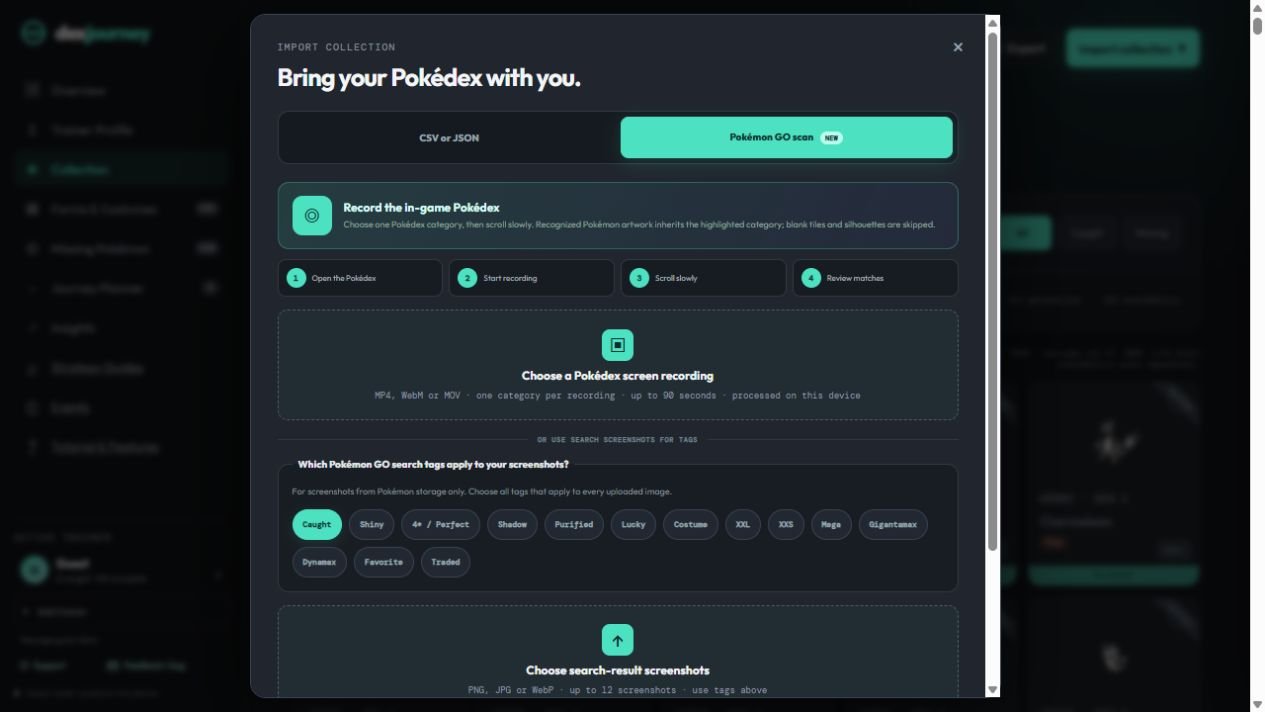
Read the recording, screenshot, and CSV import instructions.
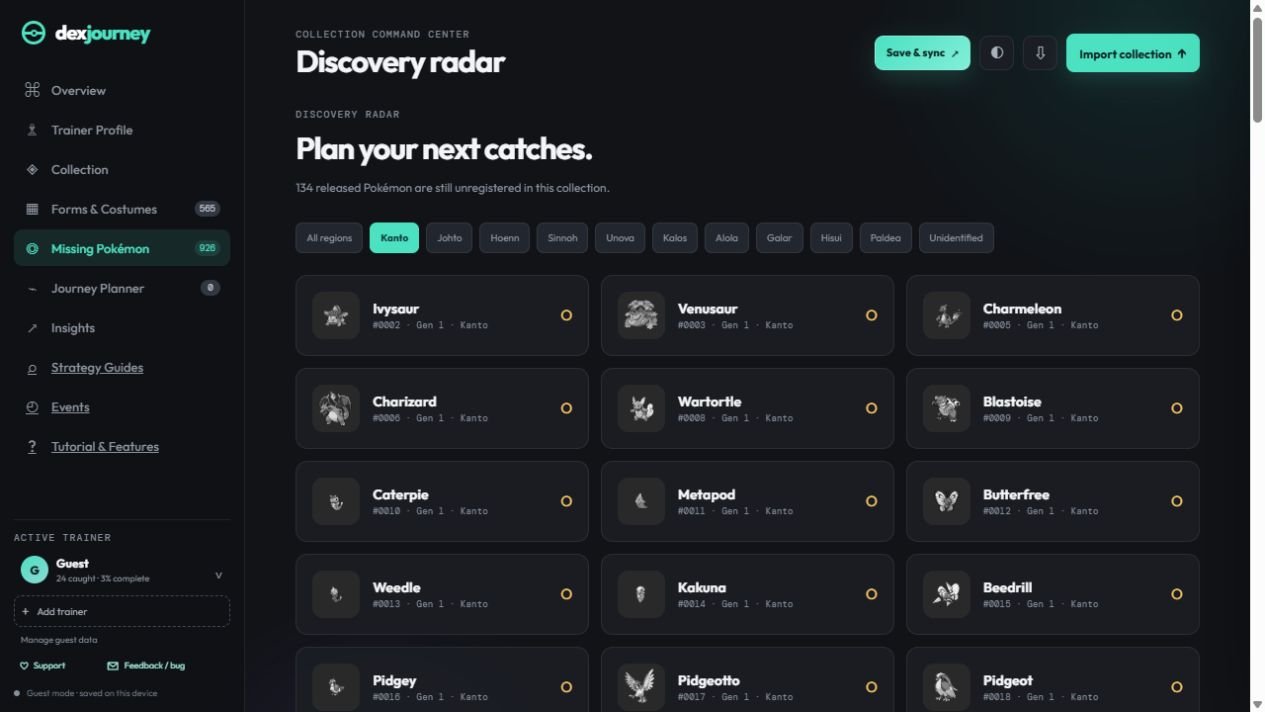
Open Missing Pokémon to see released species you have not marked caught. Select a region to focus your list; use Collection search for type or category combinations.
In Collection, select Edit, mark a Pokémon Wanted, and add a dated hunt method and note. Open Journey Planner to review your hunt board. Event guides also offer Add missing Pokémon for collection-aware event goals.
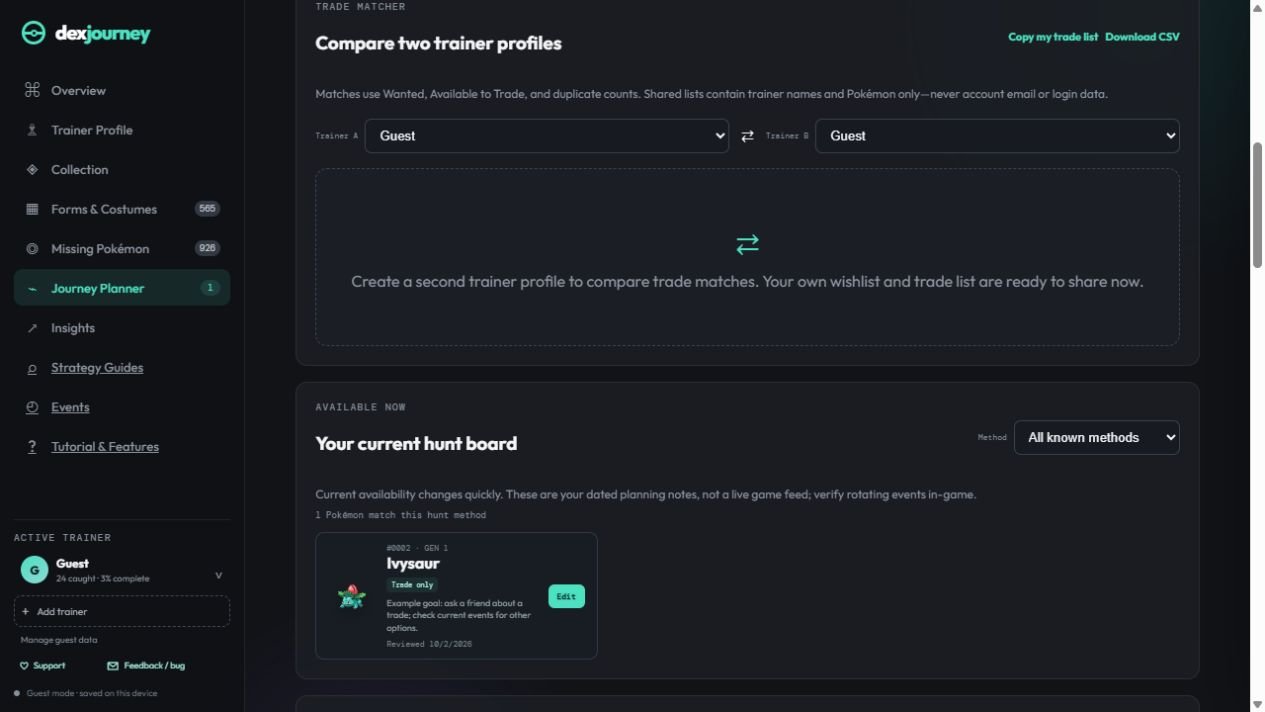
Open Hunt Planner in Journey Planner. Compare your goals with current events, check the Ivysaur species guide, or use the strategy guides to prepare.
ONE CHECKLIST, EVERY GENERATION
Use the generation controls to work through Kanto, Johto, Hoenn, Sinnoh, Unova, Kalos, Alola, Galar, Hisui, and Paldea without losing sight of your overall progress. Every card includes its National Pokédex number, generation, name, type, artwork, and Pokémon GO release status.
The checklist separates a species being released from it being caught. That means unreleased Pokémon can remain visible for planning without being counted as obtainable collection gaps.
Open the individual Pokémon guide directory for species-specific release dates, acquisition methods, evolutions, forms, and battle recommendations.
Check the current Pokémon GO event calendar to turn missing-species goals into timely catch, raid, hatch, and research priorities.
Filter directly to species you still need and review completion by generation.
Distinguish historically released Pokémon from species not yet available in Pokémon GO.
Open a card to review candy, items, gender rules, buddy tasks, time requirements, trades, and special methods.
Keep separate trainer checklists and access them across devices with a DexJourney email sign-in.
MORE THAN CAUGHT OR MISSING
A single caught checkbox cannot describe a long-running collection. DexJourney supports tags for Shiny, Shadow, Purified, Lucky, Perfect IV, XXL, XXS, Mega, and Gigantamax goals. Select a tag, update individual Pokémon, or bulk-select an entire generation for that specific category.
Category eligibility prevents impossible combinations from inflating your missing totals. Forms and variants have their own catalog so regional forms, patterns, styles, and transformations do not have to be compressed into one species record.
HOW IT WORKS
Account safety: DexJourney is a manual companion and never requests your Pokémon GO, Google, Facebook, Apple, Niantic, Scopely, or Pokémon Trainer Club password.
COMMON QUESTIONS
No. DexJourney does not log into Pokémon GO. You can update your checklist manually, scan your own Pokédex screen recordings or storage screenshots, and import CSV/JSON files. Review recognition results before saving; a scan is not a direct connection to your game account.
Yes. Profiles keep each trainer’s progress separate, which is useful for families, alternate accounts, or helping friends compare missing Pokémon.
Yes. The Forms & Variants Dex tracks regional forms, patterns, styles, fusions, and other released forms separately from the base-species checklist.
Record one Pokédex category at a time, scroll slowly, then choose Import collection → Pokémon GO scan. Select your recording, review the recognized category and entries, correct mistakes, and apply only the matches you accept. Scanning does not verify your collection against a game account.
Fast scrolling, blurred frames, overlays, cropped tiles, or switching categories can affect recognition. Try a shorter, slower recording of one category, keep the tile numbers visible, and check every suggested match. Use manual checklist updates for entries that still cannot be read.
Start with Missing Pokémon, check a target’s species guide, then compare its acquisition methods with the current event schedule. Add a Wanted goal and note in Collection → Edit, and review it in Journey Planner. Historically released does not mean obtainable today.
Mark Pokémon Wanted or Available to Trade, then open Trainer Profile → Compare. A signed-in link owner can publish a private, expiring comparison link. A friend can compare as a guest without creating an account; publishing the link requires an account. Only the selected trade-room information is shared, not your full collection. Read the comparison and sharing instructions.